The best office headsets under 100 balance clear meeting calls with practical comfort and easy device switching. Choose a dedicated work headset for frequent calls, or a general-purpose wireless model if music and portability matter just as much.
Quick Top Products
JLab Go Work Pop

- Flip the boom mic up to mute and down to activate it for calls.
- Pair two devices at once with Bluetooth multipoint.
- Get 50+ hours of playtime and charge with USB-C.
Best For: People who want a lightweight on-ear headset with quick boom-mic controls for everyday meetings.

JLab Go Work Wireless

- Connect to two devices simultaneously through Bluetooth multipoint.
- Use the included USB-C to 3.5mm cable for wired listening.
- The boom microphone has a red LED mute indicator.
Best For: Office workers who want one headset for Bluetooth calls, wired listening, and two-device pairing.
JLab JBuds Work Wireless

- Over-ear Cloud Foam earcups provide a cushioned fit.
- Bluetooth multipoint connects two devices simultaneously.
- The headset supports 60+ hours of playtime.
Best For: People who prefer over-ear cushions and a boom mic for frequent computer and phone calls.
SteelSeries Arctis Nova 3X Wireless
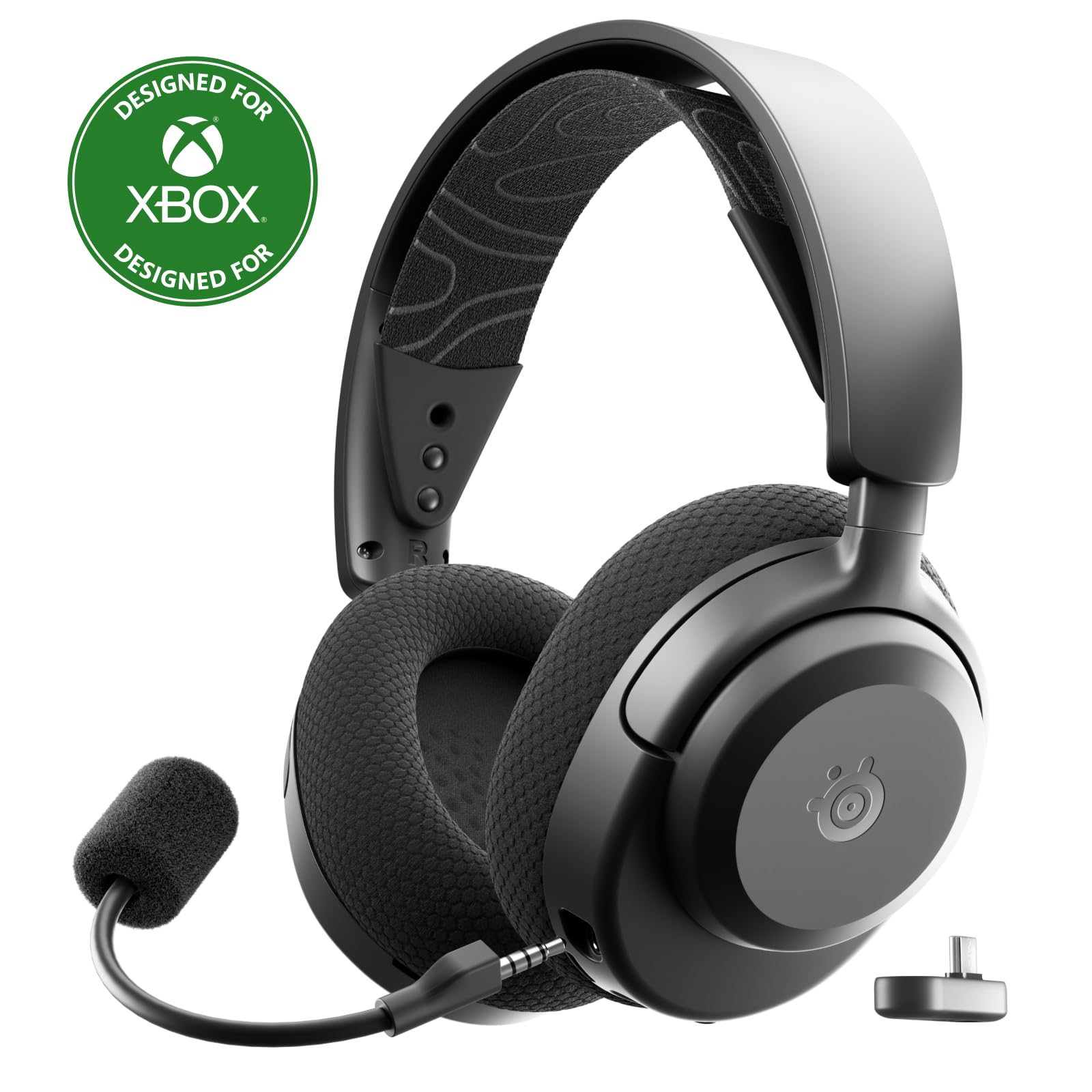
- Use the USB-C dongle to connect across multiple listed platforms.
- Pair over Bluetooth or 2.4GHz wireless.
- A 15-minute charge provides up to 9 hours of playback.
Best For: People who split time between office calls and gaming across supported devices.
JLab Rewind 2
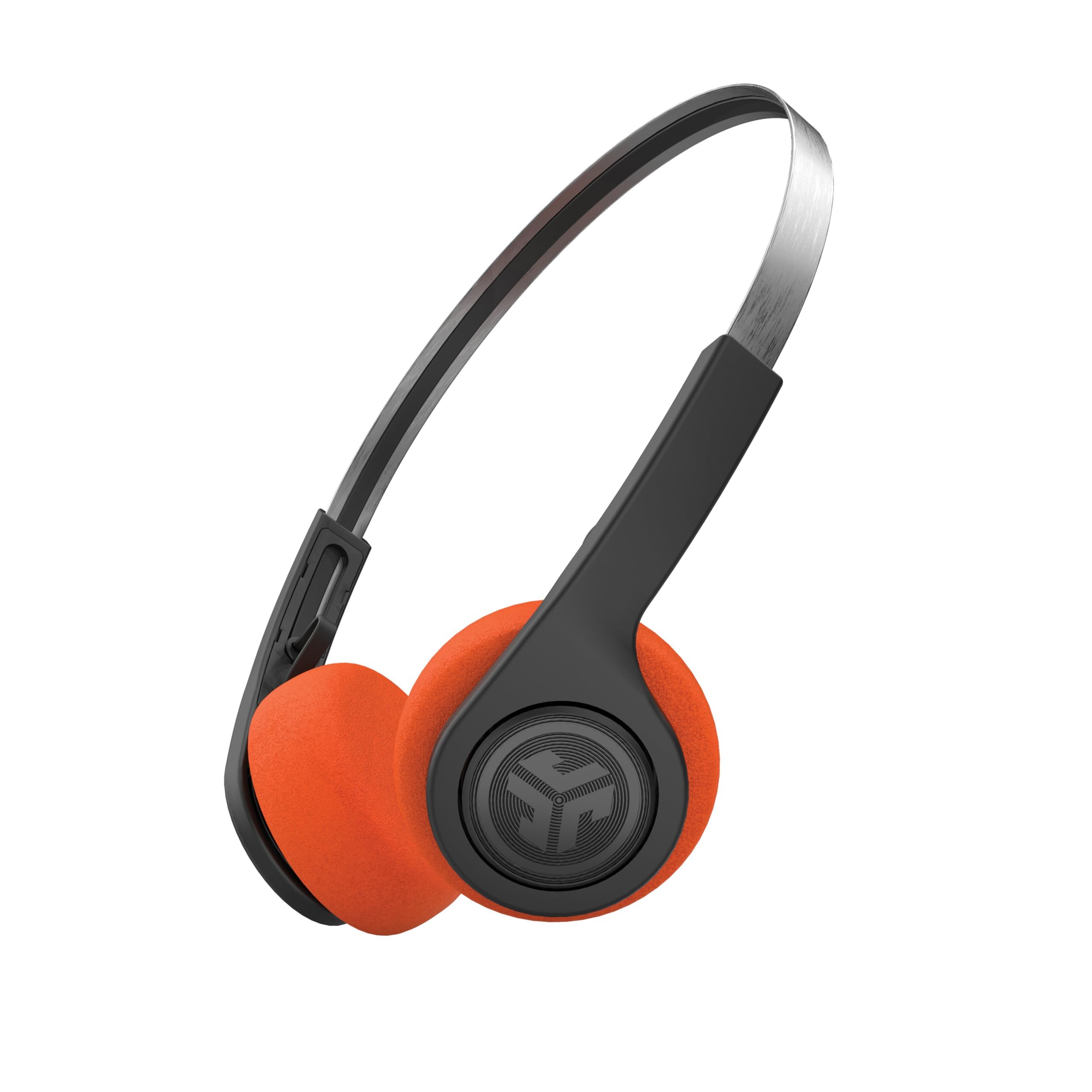
- Bluetooth multipoint connects two devices simultaneously.
- Choose from three EQ sound modes.
- The package includes orange and black foam pad sets.
Best For: Buyers who want a lightweight wireless headset for casual work calls, commuting, and listening.
Flip-to-Mute Meeting Control
JLab Go Work Pop, On-Ear Wireless Headset, Bluetooth Multipoint, Noise Canceling Boom Mic, Black
The JLab Go Work Pop is built around practical work calls: its rotating boom microphone flips up to mute and down to activate, and its MEMS microphone is designed to reduce background sounds. Bluetooth multipoint connects two devices at once, so a laptop and phone can stay paired together.
The on-ear design is lightweight and portable, with Cloud Foam earcups for longer sessions. Its 50+ hours of playtime and USB-C charging suit a busy workweek.
Voice and Music EQ modes make it easier to switch between calls and listening, though the on-ear fit may not suit everyone for extended wear.
Best For: People who want a lightweight on-ear headset with quick boom-mic controls for everyday meetings.
| Pros | Cons |
|---|---|
|
|
Choose this model if you want a compact work headset with a boom mic that doubles as a quick mute control. Its multipoint connection helps when calls move between a computer and phone.
The 50+ hour battery and USB-C charging reduce charging interruptions. Check whether you prefer on-ear cushions for a full workday; this design prioritizes portability, while an over-ear headset may feel more enveloping.
Wired or Wireless Flexibility
JLab Go Work Wireless Headsets with Microphone, 45+ Playtime PC Bluetooth Headset and Multipoint Connect to Laptop Computer and Mobile, Wired or Wireless Headphones (1 Pack)
The JLab Go Work Wireless gives desk workers two connection options: Bluetooth multipoint for two devices and an included USB-C to 3.5mm cable for wired use. Its dual microphones are intended to pick up speech while reducing surrounding environmental sound, and the rotating boom can move out of the way for listening.
A red LED at the boom tip indicates when mute is on, with headset buttons for volume, playback, calls, and mute. The 45+ hour battery and Cloud Foam earcups support extended use.
This is an on-ear design, so consider fit preference if you wear a headset throughout the day.
Best For: Office workers who want one headset for Bluetooth calls, wired listening, and two-device pairing.
| Pros | Cons |
|---|---|
|
|
This is a practical pick if you want a dedicated boom mic and the option to use a cable when you do not want a Bluetooth connection. Multipoint is useful for keeping a computer and mobile device paired, while the red LED helps confirm mute status during meetings.
Compare its 45+ hour battery with longer-running options if charging frequency matters most. Before buying, decide whether the on-ear fit and included cable meet your desk setup.
Over-Ear Fit for Long Workdays
JLab JBuds Work Wireless Headset with Microphone, Over Ear Computer Headsets, Wired or Wireless Headphones with 60+ Playtime, Multipoint Bluetooth Headset for Laptop Teams, Office with Mic (16 Pack)
The JLab JBuds Work is the over-ear option among these work-focused headsets, with Cloud Foam earcups and a rotating boom microphone. Bluetooth multipoint connects two devices simultaneously, and an included USB-C to 3.5mm AUX cable provides wired use.
Its dual-microphone setup is designed to capture the speaker's voice and reduce environmental sounds. The controls include a quick mute button and a red LED mute indicator; flipping the boom up or down also manages call handling.
With 60+ hours of playtime, it suits users who want fewer charging interruptions. Check that the 16-pack title does not reflect the offer you intend to purchase; the catalog title describes a single headset model.
Best For: People who prefer over-ear cushions and a boom mic for frequent computer and phone calls.
| Pros | Cons |
|---|---|
|
|
Pick the JBuds Work if you prefer an over-ear fit and want the longer 60+ hour battery figure in this group. The wired cable, multipoint pairing, and boom-mic call controls make it suited to a desk shared by a computer and phone.
One buying detail needs attention: the title says “16 Pack,” while the catalog title names the headset without a quantity. Confirm what the purchase includes, and consider whether over-ear coverage suits your comfort preference.
Gaming and Office Device Switching
SteelSeries Arctis Nova 3X Wireless Multi-Platform Gaming Headset — Mobile App Control — 40 HR Battery — Neodymium Magnetic Drivers — 2.4GHz/Bluetooth — Xbox, PS5, PC, Switch, Mobile — Black
The SteelSeries Arctis Nova 3X is a gaming headset that can also serve buyers who want wireless audio across work and entertainment devices. It includes a USB-C dongle for plug-and-play connections with Xbox, PC, PlayStation, Switch, handhelds, phones, or tablets, and also supports Bluetooth.
Its listed battery life is up to 40 hours, with fast charging that provides up to 9 hours of playback from 15 minutes. A stretchy headband and adjustment points address fit, while the mobile app offers game audio presets.
The supplied details focus on gaming and general audio rather than call controls, so check microphone and meeting needs before choosing it for a call-heavy office.
Best For: People who split time between office calls and gaming across supported devices.
| Pros | Cons |
|---|---|
|
|
Choose this headset if your work setup overlaps with gaming and you value USB-C dongle connectivity plus Bluetooth. The fast-charge figure is useful when you need a quick top-up, while its 40-hour battery is shorter than some work-focused choices here.
The product details emphasize game presets and platform flexibility. Check that its microphone performance and meeting controls fit your office routine, since those specifics are not provided.
Multipoint with Retro Styling
JLab, Rewind 2, Retro Wireless on-Ear Headphones, Bluetooth multipoint, EQ3, Google Fast Pair, Be Aware, Wireless Sharing, Black
The JLab Rewind 2 combines a retro on-ear design with features that can support everyday laptop-and-phone use. Bluetooth multipoint connects two devices at once, and Google Fast Pair supports quick pairing with Android.
Its 20+ hours of playtime and USB-C charging suit regular portable listening. Three EQ modes let you choose Signature, Balanced, or Bass Boost sound, while on-ear controls handle volume, tracks, and calls.
Two included foam pad sets provide a choice of orange or black. This is a general-purpose headphone rather than a dedicated office headset, so buyers with frequent meetings should consider whether its built-in microphone and call controls meet their needs.
Best For: Buyers who want a lightweight wireless headset for casual work calls, commuting, and listening.
| Pros | Cons |
|---|---|
|
|
This model fits someone who wants headphones for commuting and casual work listening, with the convenience of switching between two paired devices. Its retro design, EQ options, and two pad sets add personal choice, while the 20+ hour battery is shorter than the work-specific JLab options.
If meetings are central to your day, verify that the built-in microphone and on-ear call controls suit your needs before prioritizing its style and portability.
How to Choose Office Headsets Under 100
How We Picked Best Office Headsets Under 100
We prioritized supplied models with clear workplace signals: a boom microphone, mute or call controls, long work-oriented battery life, and ways to connect a computer and phone. The JLab Go Work and JBuds Work models match that brief most directly, with multipoint pairing and call-focused controls.
The SteelSeries Arctis Nova 3X offers broader gaming platform support, while the Rewind 2 is a more general-purpose option for mixed listening and casual calls.
We also kept the products under the $100 ceiling based on the supplied snapshot prices. Kids' headphones, basic listening models, and ANC headphones without dedicated call features were left out because they do not fit the office headset use case as closely.
Comparing Office Headsets for Calls and Work
The biggest practical differences are headset fit, microphone controls, and connection options. The JBuds Work uses an over-ear design and offers the longest listed work headset battery life here, while the Go Work models use on-ear cushions and boom microphones.
The Go Work Pop adds flip-to-mute control; the Go Work Wireless pairs that with a visible red mute indicator and a wired cable option.
The Arctis Nova 3X stands apart for gaming-oriented platform support and USB-C dongle connectivity, but its supplied details give less office-call guidance. The Rewind 2 emphasizes portability, EQ modes, multipoint, and retro styling instead of a dedicated boom mic.
Match those strengths to how often you take meetings versus listen to audio.
| Product | Standout features | Best for |
|---|---|---|
| JLab Go Work PopCheck Price |
| People who want a lightweight on-ear headset with quick boom-mic controls for everyday meetings. |
| JLab Go Work WirelessCheck Price |
| Office workers who want one headset for Bluetooth calls, wired listening, and two-device pairing. |
| JLab JBuds Work WirelessCheck Price |
| People who prefer over-ear cushions and a boom mic for frequent computer and phone calls. |
| SteelSeries Arctis Nova 3X WirelessCheck Price |
| People who split time between office calls and gaming across supported devices. |
| JLab Rewind 2Check Price |
| Buyers who want a lightweight wireless headset for casual work calls, commuting, and listening. |
Choosing a Work Headset for Your Desk Setup
If you use a computer and mobile phone throughout the day, Bluetooth multipoint can keep both paired and reduce reconnecting. The Go Work Pop, Go Work Wireless, JBuds Work, and Rewind 2 each mention two-device pairing.
The Go Work Wireless and JBuds Work also include a USB-C to 3.5mm cable, which can suit a desk where wired listening is useful.
Consider the mute method you prefer. A boom that flips up or down provides a physical cue, while a red LED can make mute status easier to see.
For frequent meetings, a dedicated work headset's microphone controls may be more relevant than gaming presets or music EQ settings.
Who Should Choose Which Office Headset
Choose the Go Work Pop for a lightweight on-ear headset with flip-to-mute and 50+ hours of playtime. Consider the Go Work Wireless if wired and Bluetooth use both matter, or the JBuds Work if you prefer over-ear cushions and its 60+ hour battery figure.
The Arctis Nova 3X suits a desk that also serves as a gaming setup, provided its call features meet your needs. The Rewind 2 is better suited to casual calls alongside commuting and music listening.
In either case, check fit preference, connection requirements, and the offer contents before ordering.